💾 Backups Management
Critical data protection and system recovery management for administrative departments and real estate company managers
📋 Overview
The Backups Management section is a critical system protection module designed exclusively for administrative departments and real estate company managers to maintain comprehensive data security, system recovery capabilities, and business continuity protection. This essential module provides complete control over both database-only backups and full CRM system backups to ensure your business data remains secure and recoverable under all circumstances.
All backup operations require coordinated approval and oversight from IT Department, Operations Manager, System Administrator, and CRM Manager to ensure proper security protocols and system integrity maintenance throughout the backup and recovery processes.
⚠️ Authority Requirements
Critical Management Coordination: All backup operations in this section must be performed with explicit knowledge and approval from the following departments and personnel:
🔧 IT Department
Technical oversight and infrastructure management
📊 Operations Manager
Business continuity and operational approval
🛡️ System Administrator
System security and access control management
🎯 CRM Manager
CRM system integrity and data protection oversight
🗃️ Database Backup Management
Database Backup provides comprehensive data-only protection, preserving all customer information, employee records, system settings, and configuration data without including system files or application components. This focused backup approach ensures rapid data recovery while maintaining smaller file sizes for efficient storage management.
📊 Database Configuration
🏷️ Database Information
Database Name: profitV4CRM - This is the primary database containing all your CRM operational data, customer records, employee information, and system configurations.
🎯 Data Protection: Database backups preserve all customer data, employee records, system settings, lead information, project details, financial records, and CRM configurations in a compressed SQL format for maximum security and efficiency.
📸 Database Backup Interface
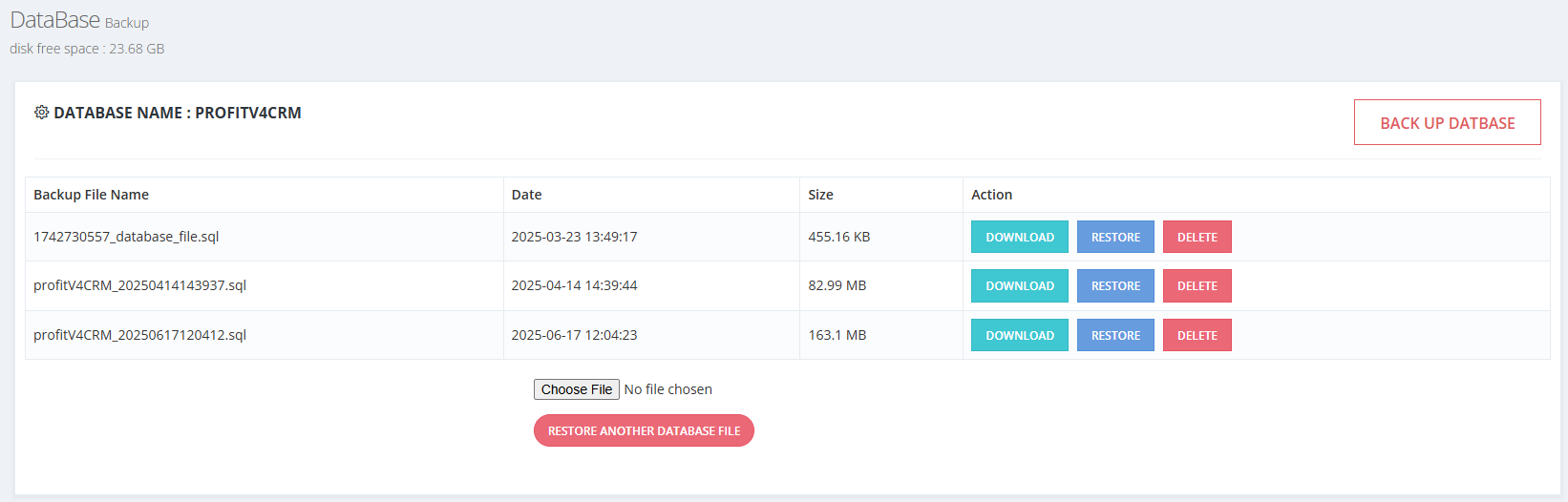
Comprehensive Database Backup Management Interface with System Information
🔧 Database Backup Features
📋 Backup Files Management Table
The system maintains a comprehensive table showing all available database backup files with detailed information for effective backup management and recovery planning.
| Backup File Name | Date | Size | Action |
|---|---|---|---|
| 1742730557_database_file.sql | 2025-03-23 13:49:17 | 455.16 KB | 🔽 📥 🗑️ |
| profitV4CRM_20250414143937.sql | 2025-04-14 14:39:44 | 82.99 MB | 🔽 📥 🗑️ |
| profitV4CRM_20250617120412.sql | 2025-06-17 12:04:23 | 163.1 MB | 🔽 📥 🗑️ |
⚡ Database Action Controls
🔽 DOWNLOAD
Secure Download: Download backup files to secure external storage locations for off-server protection and disaster recovery preparation.
📥 RESTORE
System Recovery: Restore database to a previous backup state, replacing current data with the selected backup version.
🗑️ DELETE
Space Management: Permanently remove backup files to free server storage space. Use carefully with proper off-server backups.
💽 Server Storage Information
📊 Disk Free Space: 23.68 GB - Monitor server storage capacity to ensure continuous backup operations and prevent automatic backup service interruption.
🔄 BACKUP DATABASE
Create new database backup with current system data, preserving all customer information, employee records, and system configurations.
🎯 Instant Protection: Generate immediate backup of current database state for secure data preservation.
📁 RESTORE ANOTHER DATABASE FILE
Upload and restore external database backup files that were downloaded and stored outside the server for enhanced security.
🏢 CRM Complete System Backup
CRM Backup provides comprehensive full-system protection, preserving the entire CRM installation including all databases, system files, uploaded documents, configurations, customizations, and server settings. This complete backup solution ensures total system recovery capability for comprehensive business continuity protection.
🎯 Complete System Coverage
Full CRM backup encompasses every component of your system, providing total protection for complete disaster recovery and system migration capabilities.
📊 Database Complete
All customer data and system configurations
📁 System Files
Complete CRM application and server files
🗂️ Uploads
All uploaded documents and media files
⚙️ Configurations
Custom settings and system preferences
📸 CRM Complete System Backup Interface
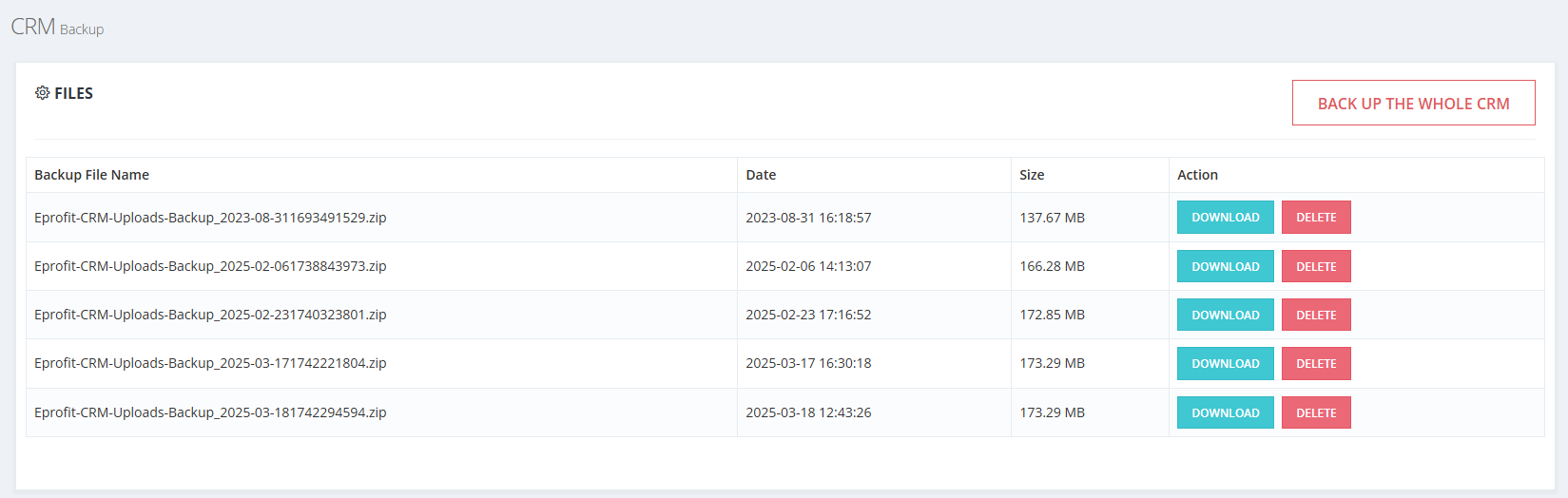
Comprehensive CRM System Backup Management Interface with Complete System Protection
📦 CRM Backup Files Management
📋 System Backup Files Inventory
Comprehensive table showing all complete CRM system backup files with detailed information for full system recovery and disaster preparedness planning.
| Backup File Name | Date | Size | Action |
|---|---|---|---|
| Eprofit-CRM-Uploads-Backup_2023-08-311693491529.zip | 2023-08-31 16:18:57 | 137.67 MB | 🔽 📥 🗑️ |
| Eprofit-CRM-Uploads-Backup_2025-02-061738843973.zip | 2025-02-06 14:13:07 | 166.28 MB | 🔽 📥 🗑️ |
| Eprofit-CRM-Uploads-Backup_2025-02-231740323801.zip | 2025-02-23 17:16:52 | 172.85 MB | 🔽 📥 🗑️ |
| Eprofit-CRM-Uploads-Backup_2025-03-171742221804.zip | 2025-03-17 16:30:18 | 173.29 MB | 🔽 📥 🗑️ |
| Eprofit-CRM-Uploads-Backup_2025-03-181742294594.zip | 2025-03-18 12:43:26 | 173.29 MB | 🔽 📥 🗑️ |
🎯 Complete System Actions: Each CRM backup file includes the same action options (DOWNLOAD, RESTORE, DELETE) providing complete system recovery capabilities, full disaster recovery protection, and comprehensive business continuity assurance for your entire CRM installation and all associated data.
🚨 CRITICAL SECURITY WARNING
⚠️ ESSENTIAL BACKUP SECURITY: Store backup files in secure locations both inside and outside the server environment. These backup files are your FIRST and LAST defense against data loss and system failures. No data recovery is possible without these files.
🏢 Off-Server Storage
Storing backups ONLY on the server is NOT secure. Maintain confidential, secure off-server copies in multiple locations for disaster recovery protection.
💾 Storage Management
Monitor server storage consumption to prevent automatic backup service interruption. Configure backup settings in General Settings to optimize storage usage.
🔧 MANDATORY IT CONSULTATION: Consult IT Department before performing ANY actions in this section. Improper backup management can result in TOTAL DATA LOSS and complete system failure with NO RECOVERY possibility.